
Every guest message, in one inbox
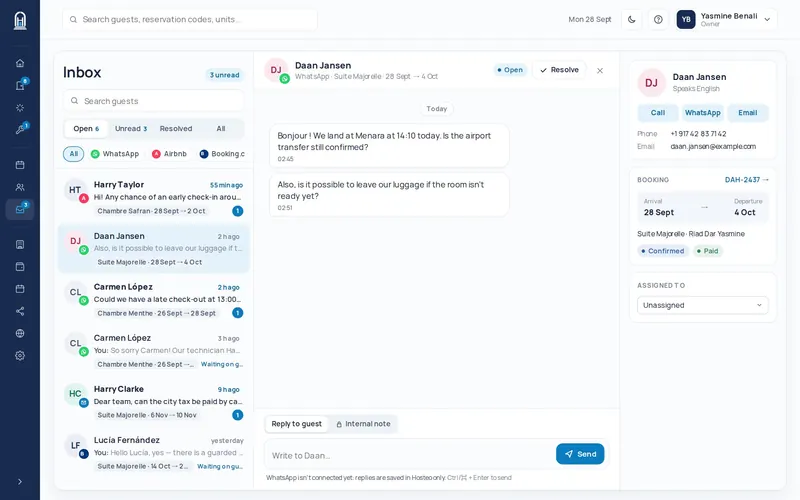
WhatsApp Business, Airbnb, Booking.com and email arrive in one place, each conversation next to the guest’s booking. Your team replies from Hosteo, with internal notes the guest never sees.
30-day free trial · no credit card · up and running in a day
What is a unified inbox?
It is a single screen where all your guests’ messages arrive, whatever channel they write on: WhatsApp, Airbnb or Booking.com messaging, email. Instead of opening four apps, your team opens one.
The point is not just to gather messages, it is to link them: each conversation is tied to the guest and their booking, so you reply with the right context.
The problem it solves
Scattered messages
WhatsApp on one phone, the Airbnb app, the Booking.com extranet, an email inbox: messages get lost between tools.
Double or forgotten replies
Without a shared view, two people reply, or nobody does.
A team without context
To answer “can I arrive earlier?”, someone has to look up dates, unit and balance in another tool.
Every conversation with its context
Next to the thread, a panel shows the guest and their booking: dates, balance, documents, payment. No need to switch tools to answer correctly.
- Booking, stay and payment next to the thread
- Balance due and document status visible
- Booking requests from your website accepted or declined from the panel
- Guest contact details and language
Work as a team without stepping on each other
The inbox is shared by the team: everyone sees what is waiting for an answer and what has been handled.
- Internal notes only the team sees
- Filter by channel (WhatsApp, Airbnb, Booking.com, email) and by stay status
- Closing and archiving of handled conversations
- Quick send from the keyboard (Ctrl or ⌘ + Enter)
How it works
1. Connect your channels
WhatsApp Business with a QR code, like WhatsApp Web; Airbnb and Booking.com through the channel manager; email with a forward to the address Hosteo gives you.
2. Messages arrive
Each message lands in the inbox, linked to the guest and their booking when there is one.
3. Your team replies
From Hosteo, for every channel, with a new-message counter and filters by channel and stay status.
4. You archive
A handled conversation is closed or archived: only what is waiting for an answer is left.
The channels in the inbox
| Channel | How it connects |
|---|---|
| WhatsApp Business | You link your number by scanning a QR code, like WhatsApp Web. The conversations arrive in the inbox. |
| Airbnb and Booking.com | Messages come through the built-in channel manager. Messages sent from the Airbnb or Booking.com apps are imported too. |
| You forward your mailbox to the address Hosteo gives you: emails arrive in the same inbox. | |
| Your booking website | Booking requests from your website arrive in the inbox, with the dates and the guest. |
What is in the inbox
WhatsApp Business
You link your number by scanning a QR code, like WhatsApp Web. The conversations arrive in the inbox.
Airbnb and Booking.com
Messages come through the built-in channel manager. Messages sent from the Airbnb or Booking.com apps are imported too.
You forward your mailbox to the address Hosteo gives you: emails arrive in the same inbox.
Your booking website
Booking requests from your website arrive in the inbox, with the dates and the guest.
Internal notes
Internal notes only the team sees
Automatic messages
Booking confirmation, registration link, arrival message, review request after the stay: scheduled messages go out on time and stay in the guest’s conversation. Your team sees what was sent before replying.
Automatic messages stay in the thread
Booking confirmation, registration link, arrival message, review request after the stay: scheduled messages go out on time and stay in the guest’s conversation. Your team sees what was sent before replying.
AI agent: coming soon Soon
An AI agent will suggest replies to guests’ common questions, reviewed and sent by your team. It is not available yet.
Four habits that save time
- Always reply from the inbox, not from the apps, so the whole history stays in one place.
- Write useful details (arrival time, allergy, special request) as an internal note: the whole team finds them.
- Archive a conversation as soon as it is handled: the inbox then shows only what is waiting.
- Let automatic messages answer repetitive questions (confirmation, registration, arrival).
Which plan?
The unified inbox is part of the Pro plan (79 MAD per unit per month) and the Group plan. It is not included in the Essentiel plan. 30-day free trial, no credit card.
Frequently asked questions
What is a unified inbox?
A single inbox where the messages from all your channels (WhatsApp, Airbnb, Booking.com, email) arrive, each linked to the guest and their booking.
How do I connect WhatsApp?
You link your WhatsApp Business number by scanning a QR code, like WhatsApp Web. Conversations then arrive in the inbox and your team replies from Hosteo.
Do Airbnb and Booking.com messages arrive too?
Yes, through the built-in channel manager. Messages sent from the Airbnb or Booking.com apps are imported too.
Can the guest see my internal notes?
No. Internal notes stay within your team and are never sent to the guest.
Is the inbox included in the Essentiel plan?
No. It is part of the Pro and Group plans.
Do I need to install an app?
No. Hosteo runs in the browser, on desktop, tablet and phone.
Can I try it before committing?
Yes: 30-day free trial, no credit card.
Let’s see your inbox for real.
30-day free trial, no credit card. A 30-minute demo, online or on site.