
Everything a hospitality team uses every day.
Twelve connected modules, one source of truth. Here’s what Hosteo does today — and what’s coming next.
Today’s dashboard
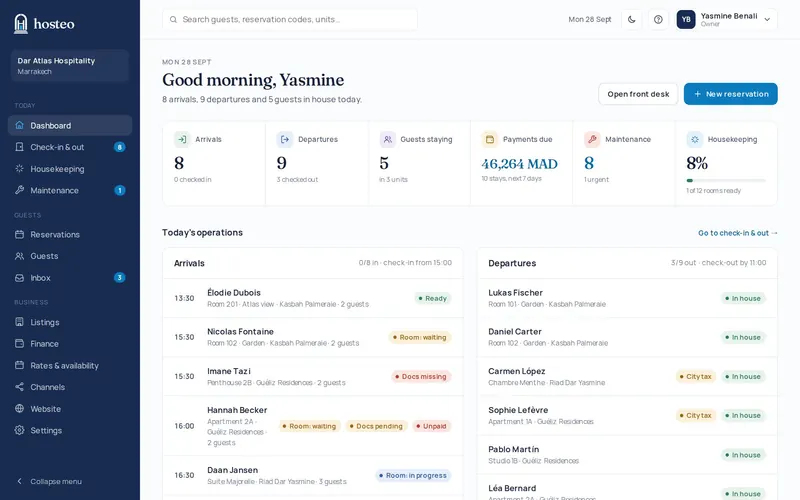
The first page your team opens in the morning.
- Today’s arrivals, departures and guests in house
- Payments due over the next 7 days
- Open maintenance and housekeeping progress
- Alerts: room not ready, missing documents, unanswered messages
- Recent team activity
Channel manager & rates
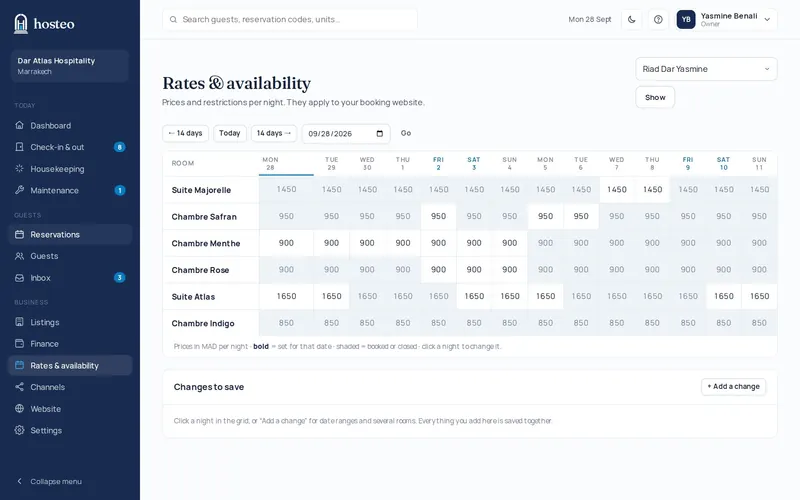
Your prices everywhere, no retyping.
- Airbnb, Booking.com, Expedia and Vrbo in sync
- Prices, minimum stay and closures per night or season
- OTA bookings and cancellations imported automatically
- iCal calendars from other platforms imported
- Riads and hotels connected as one property with rooms; apartments and villas listing by listing
- Your own booking website, on your own domain name
- Online payment on your website: CMI, Stripe, PayPal, bank transfer or cash with a deposit
Reservations & guests
Your planning and your guests, connected.
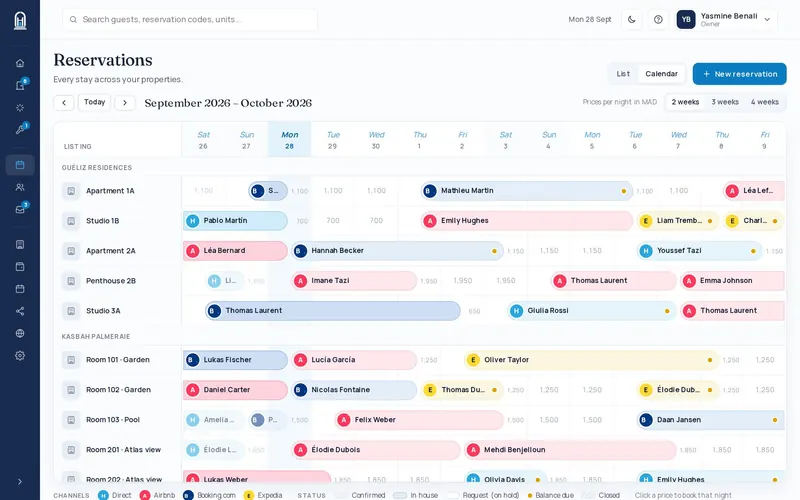
- 2- to 4-week timeline per unit, with the price of free nights
- Reservations list as cards: channel, stay, listing, balance
- Create, edit, cancel, search
- Block dates with a note, or change a price or the minimum stay, right from the calendar
- Owner stays: free, cleaning planned, no message sent to the guest
- Guest profiles: stays, documents, notes, message history
Online registration & police form
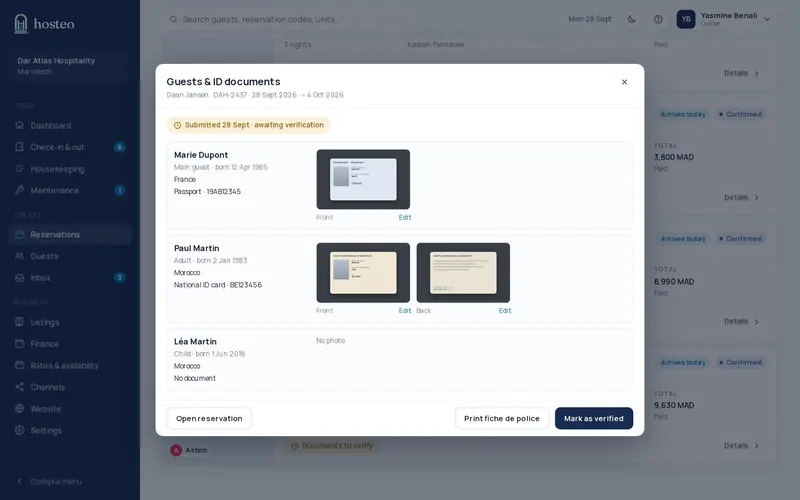
Guests’ identity, before they arrive.
- Private link sent by email and WhatsApp Business, with an automatic reminder
- Passport (one photo), national ID card or residence permit (front and back)
- Documents to verify, crop or rotate in one click
- Individual police form ready to print
- Photos deleted automatically after the stay
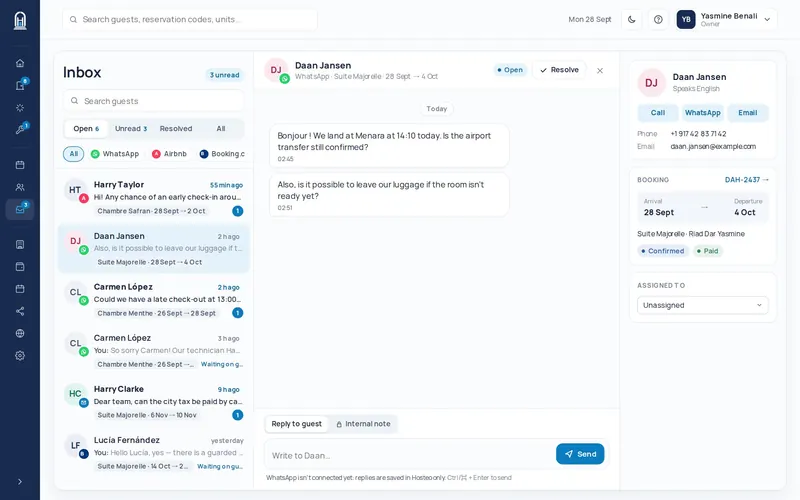
Unified inbox
Every guest message in one place.
- WhatsApp Business connected to your number
- Airbnb and Booking.com messages in the same inbox
- Each conversation linked to the guest and their booking
- Internal notes never sent to the guest
- Scheduled automatic messages (confirmation, registration, arrival, post-stay review request), kept in the thread
- AI agent: suggested replies to common questions (coming soon)
Check-in & check-out
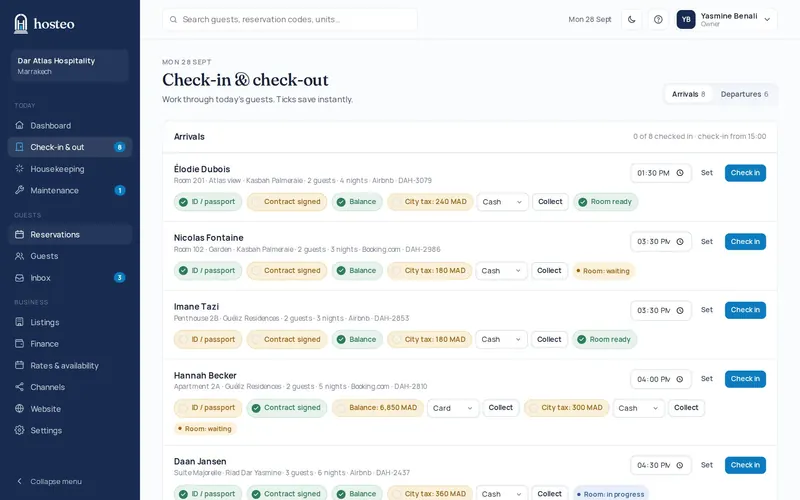
A simple flow for every guest.
- ID documents, contract, balance and city tax
- Collect by cash, card or bank transfer
- Expected arrival time and room status
- Check-out with key return that triggers housekeeping
Housekeeping & maintenance
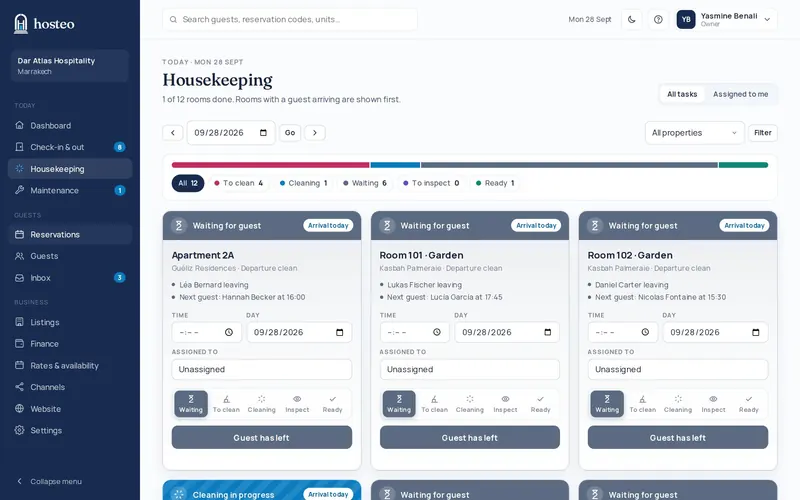
Rooms ready, repairs tracked.
- Housekeeping board generated from departures
- Same-day arrivals prioritised
- Maintenance requests with photos, priority, technician and due date
- “My queue” for technicians
- Units blocked until the repair is done
Finance
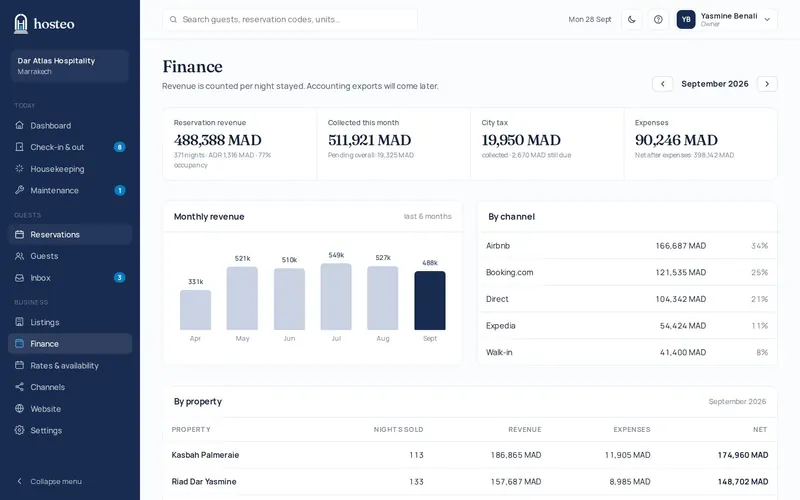
A clear view, no spreadsheet.
- Revenue recognised per night, occupancy, ADR
- Payments, outstanding balances, city tax
- Expenses by category and property
- Monthly results by property and channel
- Monthly statements for your property owners: revenue, commissions, charges, amount to pay out, with a read-only owner view
Everyone sees what they need. Nothing more.
6 ready-made roles
Owner, manager, reception, housekeeping, maintenance, read-only.
Isolated workspaces
Each company’s data is strictly separated from every other.
Secure sign-in
HTTPS, hashed passwords, two-step verification, team sign-in with a WhatsApp code, attempt limits.
Daily backups
Database and photos backed up automatically every night.
Mobile
Housekeepers and technicians work from their phones.
Multi-property
Apartments, riads, villas, aparthotels and hotels in one account, with your units imported from a CSV file.
Coming soon
AI agentSoon
Suggested replies to guests’ common questions, reviewed and sent by your team.
PriceLabsSoon
Connection to PriceLabs for dynamic pricing of your units.
Accounting exportSoon
Monthly export for your accountant.
Frequently asked questions
How do my guests pay?
On your booking website they pick from the methods you switched on: card with CMI or Stripe, PayPal, bank transfer, or cash on arrival with an online deposit. Paid bookings can be confirmed automatically; a transfer is marked received in one click.
How do I read the calendar?
A timeline per unit over two to four weeks, showing each stay’s channel, the balance due and the price of free nights. One click on a free night opens a new reservation.
Are messages sent automatically?
The registration link and reminders go out automatically, by email and, if you switch it on, by WhatsApp, and stay visible in the conversation. Your other replies stay manual; an AI agent that suggests replies is announced as “coming soon”.
Can I edit the emails sent to my guests?
Yes. The subject and text of the registration and reminder messages can be edited, in French and English, and the emails are sent in your property’s name, with your logo.
How does a room become “ready”?
Every departure creates a housekeeping task. The board moves the room from “to do” to “in progress”, “waiting”, “inspected” and “ready”, and rooms with a same-day arrival come first.
Can a technician use Hosteo on their phone?
Yes. They see their “my queue” list and move their requests forward from their phone’s browser. A unit stays blocked until the repair is done.
Does the finance module replace my accounting?
No, it complements it. Hosteo tracks revenue per night, payments, outstanding balances, city tax and expenses, with monthly results by property and by channel.